Copy My Trades: Step-by-Step Guide
Want to mirror my exact trades automatically? Follow this simple guide to get set up with "Manual Trading Journey 888" on cTrader. It takes less than 10 minutes to get started, even if you are a complete beginner.
Option 1: You Already Have a cTrader Account
If you already use cTrader, you can jump straight in!
○ Step 1: Click the link below to open my strategy profile.
○ Step 2: Click the "Start Copying" button on the top right.
👉 Copy "Manual Trading Journey 888" on cTrader Web
Option 2: You Are New to cTrader (Start Here)
Step 1: Create Your Broker Account
To copy trades, you need an account with a broker that supports the cTrader platform.
○ I highly recommend IC Markets—it’s the exact broker I use for this strategy, which ensures identical execution and minimal delay.
○ Head over to the broker's website and sign up for a new user account.
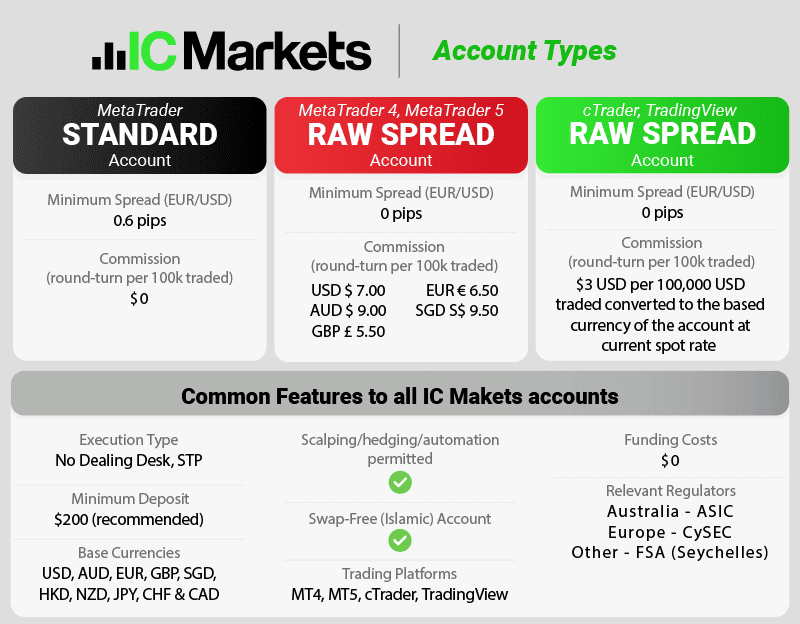
Step 2: Open & Fund a cTrader Account
Once your main broker profile is ready, you need to launch a specific account type for the trading platform.
○ Inside your broker dashboard, select Open a New Live Account and choose cTrader as your platform.
○ Select your preferred currency and leverage.
○ Fund your account using your preferred deposit method so you have capital ready to trade.
Step 3: Connect and Start Copying!
Now that your account is funded, you are ready to link it to my strategy.
○ Click the link below to open my official strategy page on the cTrader Web platform:
👉 Access "Manual Trading Journey 888" Here
○ Log in using the cTrader credentials sent to you by your broker.
○ Click "Start Copying", choose the account you just funded, and enter the amount of capital you want to allocate to this strategy.
💡 Pro-Tip for Beginners: Make sure your cTrader account is fully funded before you click "Start Copying," as the platform requires a balance to initialize the link. Once active, every trade I make will be mirrored in your account automatically.
Why Copy This Strategy?
○ Hands-Free Execution: No need to sit in front of charts all day.
○ Full Control: You can pause, stop, or adjust your allocated funds at any moment.
○ Transparency: View the entire performance history directly on the cTrader platform before committing.